Regexp_Matches Use Case
- 5 minutes read - 860 wordsI was preparing a post about finding implicit data type conversions in SQL Server queries, when I had to work through a few technical issues. That post will come later, but this created an interesting diversion based on the query used to solve those problems. I’ve written about regular expressions (regex) in SQL Server before, and that was on my mind as I analyzed extracting implicit data type conversions from query plans.
RegExp_Matches to the Rescue
As I was reading query plans, I wanted to return all of the implicit conversions, not just the first one. I also wanted a simple query. As you can guess, I used a regular expression (regex) function to solve this problem. I’ve been looking for a real-world use case for the regexp_matches function, but that’s not the only reason I used it. I can do basic XML shredding in SQL, but when things get convoluted or just too complicated, I tend to fall back on basic TSQL functions to help with the parsing after the heavy lifting has been done on the XML. I find the SQL easier to create and maintain when combining these two techniques.
For the implicit conversions, I started by finding them with regexp_substr. I could have used PATINDEX, but the regex function makes it much easier to grab the whole string, from start-to-finish, no matter what was in between. This is my current version of the regex pattern. It may change, but it’s a good starting point.
regexp_substr(TRY_CONVERT(varchar(max),QP.query_plan),'(<ScalarOperator ScalarString="CONVERT_IMPLICIT.*?)(Implicit="1">)',1,1,'im')Regex patterns aren’t something I work with on a daily basis, so it took a little trail and error to get this expression. The expression extracts strings that start with:
"<ScalarOperator ScalarString=“CONVERT_IMPLICIT”
and end with:
“Implicit=“1”>
The XML it finds will look something like this:

That was working and it returned the first instance of an implicit conversion in the query plan. The next thing I needed was to see every implicit conversion in each query. Some queries have multiple conversions, so that can help prioritize queries and gives a better picture of the problem. I considered a recursive CTE, but that would require several steps and is not very elegant. That’s when I remembered the new(ish) function, regexp_matches. It does exactly what I wanted. It not only gives the starting and ending position for each regex match in the underlying string, it gives the actual matched value.
This query puts the top 100 query plans, by execution count, into a temp table. It’s not needed for regexp_matches, but it makes querying the XML query plan data much faster.
DROP TABLE IF EXISTS #TopQueries
DECLARE @ReportDate		datetime		= GETDATE()

SELECT TOP 100
	@@SERVERNAME								ServerName
	,db_name(ST.dbid)							DatabaseName
	,OBJECT_SCHEMA_NAME(ST.objectid,ST.dbid)	ObjectSchemaName
	,OBJECT_NAME(ST.objectid,ST.dbid)			ObjectName
	,ST.objectid
	,QS.execution_count
	,QS.total_elapsed_time
	,QS.total_worker_time
	,QS.max_worker_time
	,QS.total_logical_reads
	,QS.total_physical_reads
	,QS.total_grant_kb / 1024.0					TotalGrantedMB
	,REPLACE(LEFT(ST.text,100),',','')			TextFragment
	,QS.last_execution_time
	,PL.query_plan
	,QS.max_dop
	,QS.last_dop
	,@ReportDate								ReportDate
INTO #TopQueries
FROM sys.dm_exec_query_stats QS
	OUTER APPLY sys.dm_exec_sql_text(qs.sql_handle) ST
	OUTER APPLY sys.dm_exec_query_plan(QS.plan_handle) PL
ORDER BY QS.execution_count DESC
OPTION(MAXDOP 1)
The remainder of the query pulls the XML data from the query_plan column and finds the implicit conversions with the regex function.
;
WITH XMLNAMESPACES
(DEFAULT 'http://schemas.microsoft.com/sqlserver/2004/07/showplan')
,QP_CTE AS (
SELECT
	QP.*
	,CASE
		WHEN query_plan.exist ('declare default element namespace "http://schemas.microsoft.com/sqlserver/2004/07/showplan";//Convert/@Implicit[. = "1"]') = 1 THEN 1
		ELSE 0
	END [IMPLICIT_CONVERT]
FROM #TopQueries QP
WHERE QP.query_plan.exist ('declare default element namespace "http://schemas.microsoft.com/sqlserver/2004/07/showplan";//Convert/@Implicit[. = "1"]') = 1
)
,MATCHES_CTE AS (
	SELECT
		QP.*
		,MA.*
	FROM QP_CTE QP
		CROSS APPLY regexp_matches(TRY_CONVERT(varchar(max),QP.query_plan),'(<ScalarOperator ScalarString="CONVERT_IMPLICIT.*?)(Implicit="1">)','im') MA
)

SELECT *
FROM MATCHES_CTE QP
ORDER BY QP.execution_count DESC
OPTION(MAXDOP 1)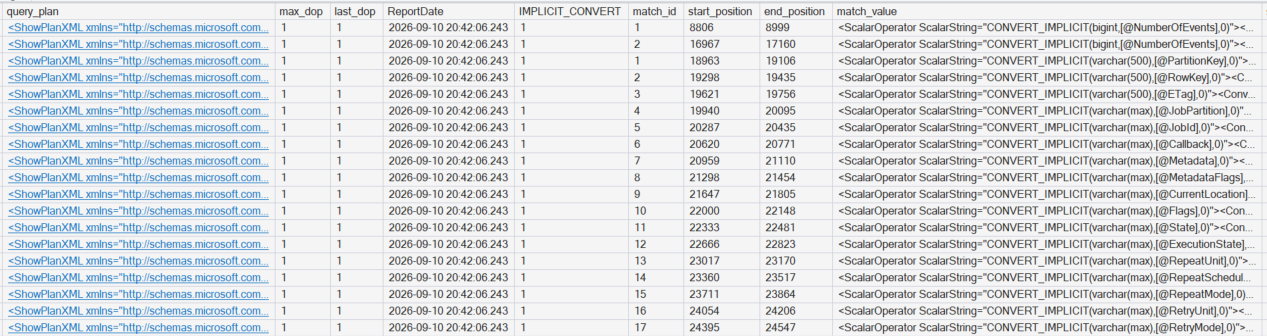
This was exactly what I wanted. It shows the string value (pattern match) of each implicit transaction and it also shows the starting and ending position in case I want to look at the XML directly for further analysis. As you can see from this example, some queries can have quite a few values returned.
To me, this is a fantastic use case for the new regex functions.
A Note on SQL Server Versions and regexp_matches
I initially tried this query on SQL managed instance (SQL MI). It worked fine the first time I tried it. When I tried it on my development machine, I received the following error.
Currently, ‘REGEXP_MATCHES’ function does not support NVARCHAR(max)/VARCHAR(max) inputs.
My first guess was that varchar(max) support had been added to regexp_matches after the initial release of SQL Server 2025. I hadn’t performed an update on my local system, so that’s where I started. The nice thing about SQL MI is that it’s updated automatically.
SELECT @@VERSIONMicrosoft SQL Server 2025 (RTM-GDR) (KB5122770) - 17.0.1135.8 (X64)
After the upgrade, my version looks like this and the query worked as expected.
Microsoft SQL Server 2025 (RTM-CU8-GDR) (KB5122769) - 17.0.4085.5 (X64)
Another Note on regexp_matches
During my initial performance testing of regexp_matches, I ran into quite a few out-of-memory errors. As noted above, Microsoft is actively working on this function (as indicated by the differences between CUs) and it has been updated since the initial release. Be aware that you could run into memory errors if you don’t keep your query results relatively small. It might be less of an issue, but I would be careful with it for now.