SQL Server Blocks vs Deadlocks
- 9 minutes read - 1709 wordsDeadlocks and excessive blocking is the bane of many development teams and DBAs. They are often at the root of performance problems. Understanding each of these problems and how to solve the root cause can be difficult. I find that the terms are used interchangeably and frequently mixed. Understanding the difference, and diagnosing the issue is crucial to resolving these problems. Both happen due to incompatible locks being held or requested on tables, but they differ in their root cause. Some troubleshooting methods work for both problems, but deadlocks generally require logic changes to fix permanently and consistently.
This post is aimed at giving a general background on blocking and deadlocks. It also shows some basic methods to find these problems and general ways to fix them. I’m not going into extreme detail. This is just an introduction.
Blocking
Blocking is a normal part of SQL Server. Blocking happens when a process (a query) has a resource locked, and another process (a different query) is trying to access the same resource. The query engine will not allow it if the lock types are not compatible. This is the ISOLATION portion of the ACID concept. It happens constantly and can be thought of as a safety feature. It is only a performance problem when blocks are excessive and take too long. The definition of too long will vary by system, but you’ll know it when you see it.
Blocking doesn’t stop other processes from running, it’s just the mechanism to only allow one process to alter data at any given time. This is a simplified explanation, but it gives you the major points. Excessive blocking will cause poor performance and it can cause transactions to fail due to timeouts. Blocked queries will eventually run when the root blocker, the query that has an exclusive lock, finishes.
Example Block
This is a very contrived example, but I have seen some examples as obvious in production environments.
This is the problematic query, causing the blocking. The transaction and the long update cause the next query to be blocked.
BEGIN TRANSACTION

UPDATE Application.Cities
SET StateProvinceID = StateProvinceID

WAITFOR DELAY '00:00:15.000'

COMMIT TRANSACTION
GO
A SELECT statement only needs a shared lock, which is very permissive and able to share data pages with most other queries. It is blocked because the first query is modifying data, which requires an exclusive lock.
SELECT *
FROM Application.Cities
GO
Deadlocks
Deadlocks are not a normal part of SQL Server. Ok - clearly they are common enough that I’m writing about them, but they aren’t something you want to happen. Many of the same techniques used to fix excessive blocking can be used to reduce deadlocks. Notice I say reduce, not eliminate. A typical deadlock happens when two different processes try to access the same resources in reverse order. Each process has has a resource locked that the other process needs and can’t finish until it gets that resource. Resource is vague. Specifically, it can be on a resource lock (i.e., table, page, key, index), worker thread, memory, parallel query execution-related resources, MARS resources, and partitioned table lock escalation. The most common deadlock is on resource locks, but you should be aware of the other types.
When a deadlock is detected by the system, one of the queries is chosen as the deadlock victim and is killed, stopped. The best way to deal with this is to fix logic and eliminate the deadlock scenario. You can also implement error trapping and retry logic if changing the application and query logic is too complicated.
Example Deadlock
The following two queries were created specifically to create a deadlock. They contain techniques I wouldn’t use in production.
BEGIN TRANSACTION

UPDATE Application.Cities
SET StateProvinceID = 4
WHERE CityID = 42

WAITFOR DELAY '00:00:10.000'

UPDATE Application.Cities
SET StateProvinceID = 1
WHERE CityID = 3

COMMIT TRANSACTION
This is the second query trying to access the same resources, but in the opposite order. The same thing can happen with parent / child tables.
BEGIN TRANSACTION

UPDATE Application.Cities
SET StateProvinceID = 1
WHERE CityID = 3

WAITFOR DELAY '00:00:10.000'

UPDATE Application.Cities
SET StateProvinceID = 4
WHERE CityID = 42

COMMIT TRANSACTION
This is the message you’ll get if there is a deadlock on your query.
Msg 1205, Level 13, State 51, Line 15
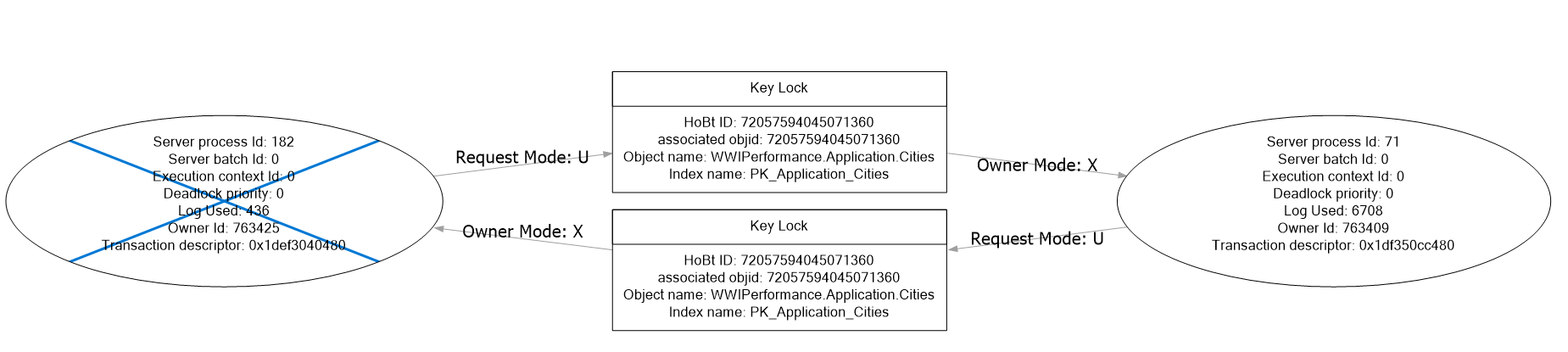
Transaction (Process ID 182) was deadlocked on lock resources with another process and has been chosen as the deadlock victim. Rerun the transaction.
If you use TRACE or XEvents to capture a deadlock graph, it can simplify troubleshooting. The deadlock graph for the above scenario looks like the following.
Diagnostics
Now that you understand a little about extended blocks and deadlocks, how do you know if that’s why your server has poor performance? There are some simple methods to see blocked queries and to capture deadlocks.
- Current processes / sys.dm_exec_sessions / DMVs
- This is my preferred method to perform an ad-hoc check for blocking. It’s easy to see the lead blocker and any other queries getting blocked. It’s not useful for deadlocks.
- Good for a quick check
- You only see events as they are happening - not historical
- You can also use the SSMS GUI or Azure portal to see current processes
- This is my preferred method to perform an ad-hoc check for blocking. It’s easy to see the lead blocker and any other queries getting blocked. It’s not useful for deadlocks.
- Extended events (Xevents)
- Can capture both blocking and deadlocks
- sqlserver.blocked_process_report
- sqlserver.xml_deadlock_report
- Set the threshold for what constitutes a blocking event
- EXEC sp_configure ‘blocked process threshold (s)’, 28
- 28 seconds works for most servers, but change it to the number that makes sense for your server
- Only needs to be set once for the server
- EXEC sp_configure ‘blocked process threshold (s)’, 28
- Can capture both blocking and deadlocks
- Trace (use XEvents if you can)
- Will be deprecated
- Not useable in Azure - so move to XEvents
- Error logs
- Requires a trace flag to be set
- 1204
- 1222
- More useful on-prem, but trace flags can be set in SQL MI
- Move to XEvents
- Requires a trace flag to be set
Blocking specific remediation
- Update statistics
- Statistics need to be up-to-date for indexes to be used efficiently and for query plans to be correct. Updating stats on a database or even just the impacted tables is often enough to fix blocking issues. Outdated (bad) statistics can be the root cause for a query that once performed well that suddenly slows down.
- Rebuild indexes
- Like statistics, indexes need to be maintained. Rebuilding indexes takes longer than updating statistics, but it may be necessary to fix the issues. This is another fix that is almost “free” from a maintenance and time perspective.
- Improve queries
- Add indexes where recommended and where indicated by the query plan.
- Add efficiency to your queries. This is very vague, but it’s a huge problem set. Look for things like cursors, functions in your WHERE clause, implicit conversions due to datatype mismatches, indexes missing on temp tables, etc. Very large queries need to be tested in sections.
- Check for parameter sniffing. If you only see the issue with certain parameters, consider this a likely parameter sniffing issue.
- You can use WITH RECOMPILE / OPTION(RECOMPILE) in your query.
- The database scoped configuration item PARAMETER_SNIFFING can be set for an entire database
- Adjust maxdop settings (max degree of parallelism)
- The maxdop setting determines the number of CPUs that can be used for a single query. It can be set at multiple levels with each level overriding the previous setting. This is an advanced setting and requires a good amount of testing. It can also have an impact on all of the other queries on the server, so be sure you understand this before making changes. But it can impact query performance enough to cause blocking on the right queries.
- But if possible - leave this setting alone and tune your queries in other ways.
- Server level
sp_configure 'max degree of parallelism', 8- Database level ’’’ ALTER DATABASE SCOPED CONFIGURATION SET MAXDOP = 1 ’’'
- Query level
SELECT *
FROM Application.Cities
OPTION (MAXDOP 1)
- Faster I/O
- This is a work-around. It might fix some things, but it won’t fix everything. But it can be cheaper than spending a lot of developer time fixing queries and adjusting settings. This can be a pragmatic method to speed up your queries, but there is no guarantee it will fix your specific blocks.
- Try the other methods first. SQL Server loves I/O, so don’t rule this out, especially if your queries are efficient.
Deadlocking specific remediation
- Improve query performance
- The same things that work for blocking queries work for any query, including those with deadlock problems. As I mentioned above, it won’t fix the cause of the deadlock, but faster running queries can make deadlocks less frequent.
- Consistent table access order for all queries
- This can be a fast change or very complicated. It depends on your queries.
- Reduce locking and explicit transactions
- This is similar to changing query logic. Explicit transactions and extended time in transactions increases the chance of a deadlock. Consider the following.
- Row level locking
- Smaller transactions (with fewer tables / locks)
- Set the deadlock priority
- The deadlock priority is a work-around. It sets the relative priority, regarding deadlocks, for the current query. This applies to the specific query in which it is set. Set your important query to HIGH priority if you need to use this work-around.
SET DEADLOCK_PRIORITY LOW
SET DEADLOCK_PRIORITY NORMAL
SET DEADLOCK_PRIORITY HIGH- Catch deadlocks
- Use TRY CATCH blocks to test for deadlocks and re-run queries if needed. This can be done in TSQL or in applications.
Summary
Extended blocks (blocking) and deadlocks often have a similar proximate cause - slow queries hitting the same tables. Improving query performance can significantly reduce blocking. If you’re lucky, it can also reduce deadlocks. The root causes are different, but faster queries alleviate both, to some degree. Deadlocks often require changing application logic, whether in stored procedures or external queries.
Careful architecture and query design can reduce the risk of blocking and deadlocks, but they can happen in any system. Busy systems are particularly vulnerable due to the volatility of the data and number of active transactions. Get familiar with basic DMVs and XEvents so you can quickly diagnose these issues. Basic query tuning will help with many blocking issues. Deadlocks can require changes to application logic, but basic techniques will also assist.
References
Transaction Compatibility Matrix
Troubleshooting Blocking
Troubleshooting Deadlocks
My SQL Performance Github